
Change history
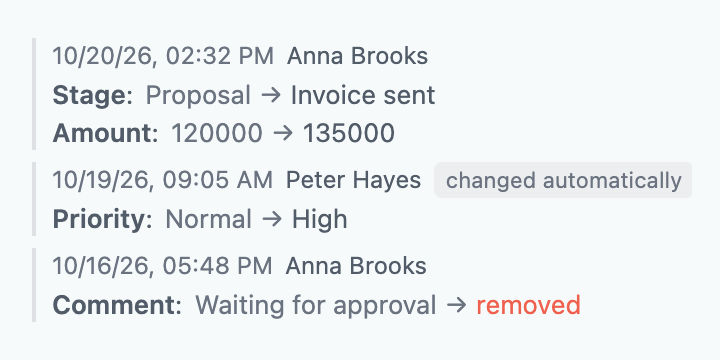
The "Change history" field shows, right in the Bitrix24 (Alaio) card, who changed which field and when, with the old and the new value. It works in deals, leads, contacts, companies and smart processes; changes made in the background with no user are marked separately, and the list of fields can be limited.
The field shows the change log of the record right in the card: who changed what and when. Each edit is a date, the employee's name and the list of fields with the old and the new value; a cleared value is marked "removed". Changes made in the background with no user (for example, by a robot or a workflow after a pause) are marked "no user" and can be hidden in the settings. Deals, leads, contacts, companies and smart process items are supported. The log can be limited to the fields you need, and a long list folds down to the chosen number of latest edits with a "show more" button. The history is kept by the app and stored encrypted on the portal itself; for the field to work, an administrator switches the history on in the app settings. The log starts when the history is switched on: earlier edits are not known. The field only reads and changes nothing.
Field settings
| Parameter | Required? |
|---|---|
| How many changes to show at once | — |
| Show changes with no user (a robot or a workflow after a pause) | — |
| Only these fields (comma-separated codes such as title, ufCrm_12; case and underscores do not matter; empty — all) | — |
| Whose rights to read the history with | — |
Scenario: settling a disputed edit
- A manager notices that the deal amount has changed
- The Change history field in the card shows who changed it and when
- The old and the new value sit side by side, so there is no need to dig through logs